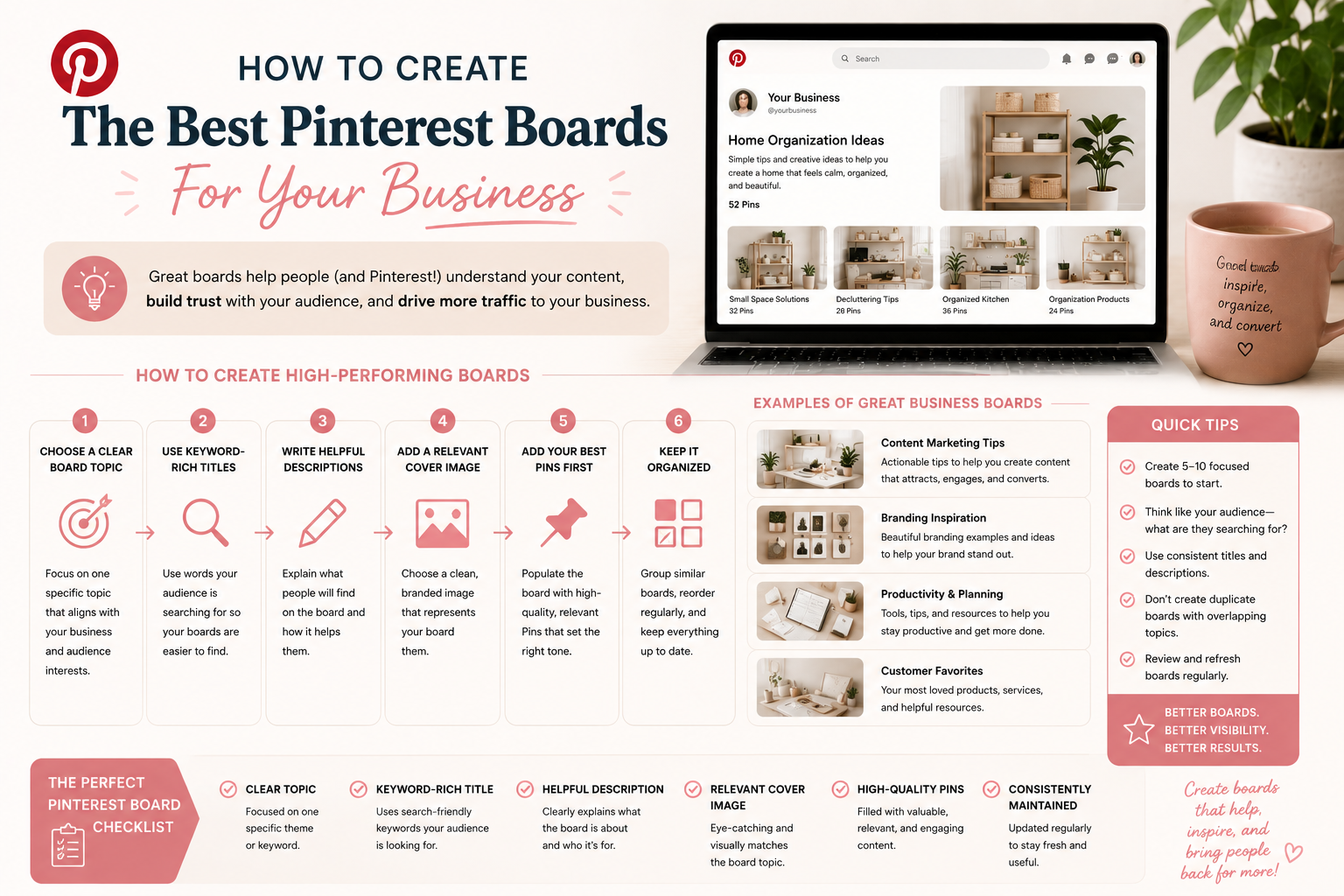
Most people treat Pinterest boards like file folders. They name them whatever feels descriptive ("Inspiration," "Branding Vibes," "Things I Love") and assume Pinterest will figure out what's on each one. Pinterest does not do that work for you.
Boards are SEO infrastructure. Each one is a chance to tell Pinterest what topic that section of your content covers and which audience should see it. Built right, your boards can pull in steady traffic on their own. Built wrong, they hold every pin you put on them back.
Use Keywords, Not Brand Language, In Board Names
The biggest fix on most accounts I audit is renaming the boards. A board called "Workspace Inspiration" sounds nice but matches almost no real Pinterest searches. A board called "Home Office Ideas" matches thousands of searches every month.
Pick board names that match what people would type into Pinterest's search bar. Use the Pinterest guided search bar to test: type your topic and see what suggestions come up. Those suggestions are the words that win.
If your existing boards are named in brand language, rename them. It is the single fastest way to improve discoverability on Pinterest for most accounts.
Write Keyword-Rich Board Descriptions
Pinterest gives you about 500 characters for each board description. Most people leave that field blank. That is throwing away free SEO signal.
Write a 2-3 sentence description for each board that naturally includes 3 to 5 related keywords. Read it out loud. If it sounds like a human introduction to the topic, it's good. If it reads like a keyword-stuffed list, rewrite it.
Example for a "Home Office Ideas" board: "Pinterest-worthy home office setups for women working from home. Small space home office layouts, organization tips, and budget-friendly desk ideas to make your work-from-home space feel like a place you want to spend your day."
How Many Boards Should You Have?
Between 10 and 30 active boards is the healthy range for most businesses. Fewer than 10 and you're probably underrepresenting topic variations Pinterest could push you on. More than 30 and your effort is spread too thin to build authority on any single topic.
Start with one board for each of your topic pillars. If you sell wedding photography, pillars might include: engagement session ideas, wedding venues, bridal portraits, wedding day timeline, wedding photography tips for couples. Five pillars, five boards.
You can add more boards as you grow into more specific topics, but resist the urge to start with 25 boards on day one. A few well-built boards beat many half-built ones.
Pick The Right Category For Each Board
Pinterest asks you to pick a category for each board (Home Decor, Food & Drink, Beauty, Business, etc.). This category is a ranking signal. It helps Pinterest decide which feed and discovery surfaces to push that board into.
Pick the most specific category that matches the board's topic. If Pinterest gives you both a broad category and a subcategory, use the subcategory. More specific signals = better matches.
Common Pinterest Board Mistakes to Avoid
Five board mistakes I see repeatedly in audits:
- Brand-language board names ("Pretty Things," "Inspo," "My Favorites") that match no real searches.
- Empty board descriptions. Pinterest reads them. Use them.
- Mixed-topic boards where you save anything that loosely fits. Pinterest can't tell what the board is about and won't push it.
- Old personal-account boards still public (a Recipes board with 200 pins of random meals) on a business account. Set those to secret or delete them.
- No fresh content on a board. Pinterest favors boards that get new pins regularly. A board you haven't pinned to in 90 days loses authority.
Audit Your Existing Boards in 20 Minutes
Quick audit you can do today. Open your Pinterest business account, go to your profile, and look at your boards in order. For each one ask: does the name match a real search? Does the description include keywords? Is the topic clear and narrow enough that someone could land on this board and immediately understand what they'd find?
Any board that fails any of those tests gets renamed, re-described, or made secret. You'll be surprised how much traffic improves over the next 60 days just from this cleanup.
If the whole thing feels like a project you don't have time for, the Growth Audit & Strategy covers your board structure, keyword gaps, and the rest of your content ecosystem in one go.
Want your boards rebuilt for SEO?
Growth Audit & Strategy reviews your boards, keywords, and account alongside the rest of your channels and hands you a prioritized roadmap. $1,297 one-time, and it comes with a 90-day implementation plan, a 60-minute consultation, and email support while you implement.
See the Growth AuditBuilding your boards yourself? My Pinterest tools page has what I use to research and design them.